Tasks, not tabs
Every task keeps its conversation, status and result. One list shows what is working, what waits for you and what is ready to review.
Claude Code GUI
VECTA is a free desktop and web app for Claude Code. Each piece of work becomes a task with its own conversation, approvals and diff, instead of a terminal tab you have to keep an eye on. Claude Code stays the one you installed, with your own sign-in.
Free. macOS, Windows, Linux and the web.
Download the desktop app for macOS, Windows or Linux and sign in. It finds Claude Code on this computer and shows whether it is ready.
Choose the project and Claude Code, then say what you need. Turn on planning when you want to agree on the approach before any file changes.
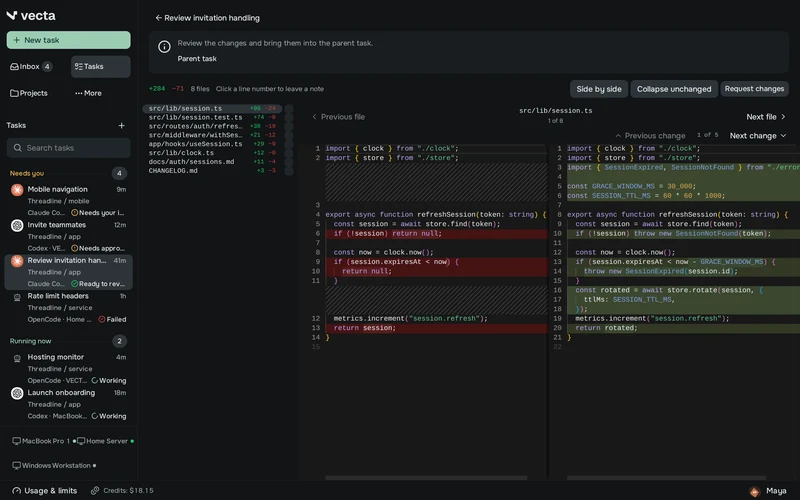
Read the diff, leave a note on a line or ask for changes in the same task. When it is right, keep it or open a pull request on GitHub.
Every task keeps its conversation, status and result. One list shows what is working, what waits for you and what is ready to review.
A request to run a command appears inside its task, with exactly what will run. Allow it once or deny it.
Changed files, a side-by-side diff and notes on lines. If the last answer went the wrong way, undo its edits.
Ask Claude Code for a plan and approve it before it touches a file.
Hand the finished changes to Codex for an independent review, without copying anything between tools.
Open a pull request on GitHub from a finished task and see its checks beside it.
No. VECTA is made by Aterna. It works with the Claude Code CLI you install and sign in to yourself, and it does not replace or resell your Claude plan.
No. Claude Code signs in the way it always does, with your Claude subscription or your own key. VECTA never asks for your Anthropic password.
The desktop app runs on macOS, Windows and Linux. The web app works in any modern browser, including on your phone.
Yes. Claude Code stays an ordinary CLI you can run yourself, and a task has its own terminal when you need one.
VECTA is free on your own computer, with all features and unlimited projects and tasks. Anthropic bills your Claude plan or API usage as usual.
Install the app, connect your computer and review Claude Code’s first change in one place.
Get VECTA free